
 Cart
CartHome/TE Edit Control/Full specifications
Version 32TE Edit Control full specifications
Everything the editor does, which languages and frameworks it plugs into, how the web editions differ, and what each release added.
TE Edit Control is the most effective way to add text editing to your application: a complete word processor delivered as a component, royalty-free for distribution. The Win32, Win64 and .NET editions can also be purchased with the full source code of the editor and its library routines.
- Editor features
- Features in pictures
- Languages and frameworks
- Web and ASP.NET interface
- Source code
- Version history
Editor features
- Fonts and character styles: any installed typeface in any size within one document; bold, italic, underline, double underline, superscript, subscript, strike-through, hidden, protected and boxed text; unlimited foreground and background colors.
- Named styles: named character and paragraph styles with style-sheet support.
- Tabs and paragraphs: left, right, center and decimal tab stops; indents, spacing, borders and shading; multilevel bullets and numbered lists with list overrides.
- Pages and sections: page headers and footers, page breaks, automatic repagination and page numbering; multiple sections per document, each with its own columns, paper size, orientation and margins; page mode for side-by-side column editing.
- Print view: WYSIWYG print view mode, print preview with zoom, zooming and background images.
- Tables: tables and nested tables, cell splitting and merging, vertical text, floating tables with text wrapping, repeating header rows.
- Pictures and frames: embedded and linked pictures from disk or clipboard; text and picture frames that body text flows around, positioned and sized with the mouse; text boxes, shapes, line and box drawing; watermarks.
- Document tools: track changes, margin comments, table of contents, bookmarks, footnotes and endnotes, auto-completion, input and check-box fields, hyperlinks, read-only mode.
- Mail-merge: users insert field names while editing; merge API functions fill field data when printing under your program's control, including repeating fields.
- Printing from code: print without opening an editing session by passing a printer device context and text rectangle; output can go to the screen, a printer or a metafile.
- Clipboard, OLE and drag-and-drop: text, RTF, bitmap, Windows metafile and enhanced metafile clipboard formats.
- Optional UI: built-in menu, scroll bars, ruler, toolbar and status ribbon, or drive the editor from your own; full control over the window style (child or overlapped).
- Capacity: unlimited document size and an unlimited number of editor windows open at once.
- File formats: DOCX, RTF, plain text and the editor's native format; DOC Add-on imports legacy Word DOC files.
- Languages: Unicode throughout, including right-to-left and mixed Latin/RTL text, Asian and Indic scripts, and multi-character glyphs.
- API: functions to set and retrieve data and operating variables and to apply character and paragraph formatting from your program; the editor also reports its events to your program through messages and notifications.
- Add-ons: HTML Add-on for HTML import and export, SpellTime for on-demand and as-you-type spell checking, WinPDF Converter for PDF output.
Features in pictures
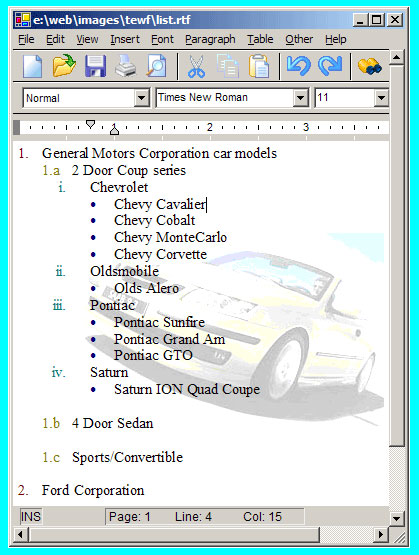
Lists and bullets
- Multilevel bullets and lists
- Unlimited bullet symbols
- Bullet font and color control
- List override control
- Numerous list formats
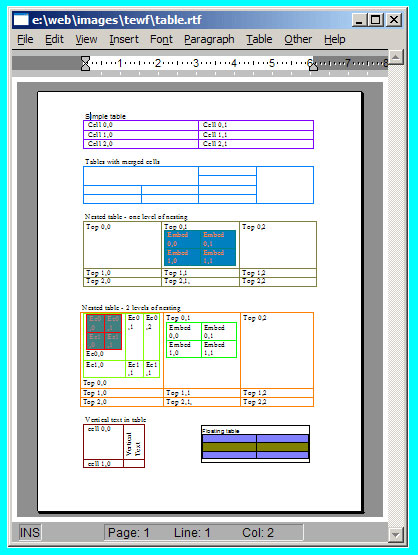
Simple and complex tables
- Cell splitting and merging
- Nested tables
- Vertical text in table cells
- Floating tables with text wrapping
- Repeating table headers
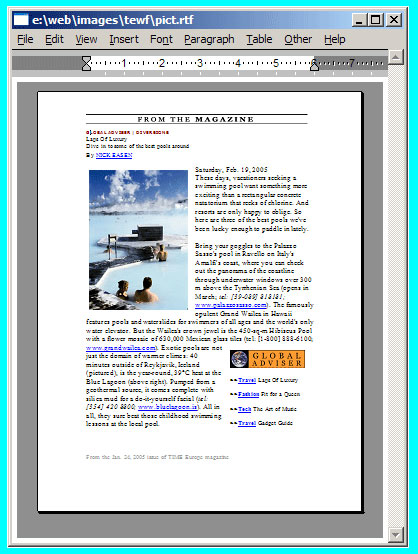
Text around pictures
- Floating or embedded pictures
- Positionable text boxes and drawing objects
- Object z-order control
- Shape grouping
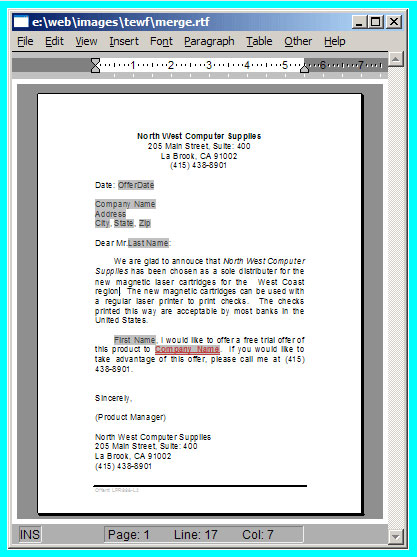
Mail-merge and hyperlinks
- Populate and print mail-merge fields
- Printing without creating the text control
- APIs for repeating fields
- Flexible hyperlink fields
Document features
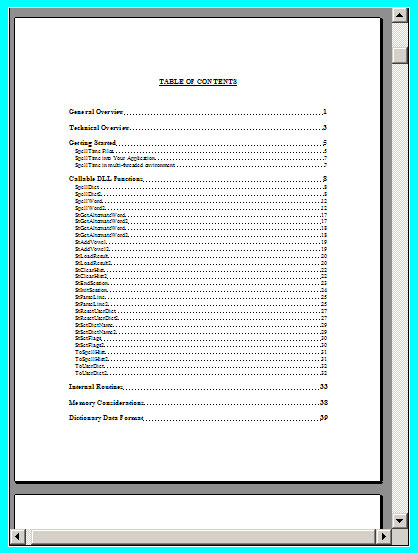
- Table of contents
- Track changes
- Style sheets
- Footnotes and endnotes
- Input and check-box fields
- Watermarks and auto-completion
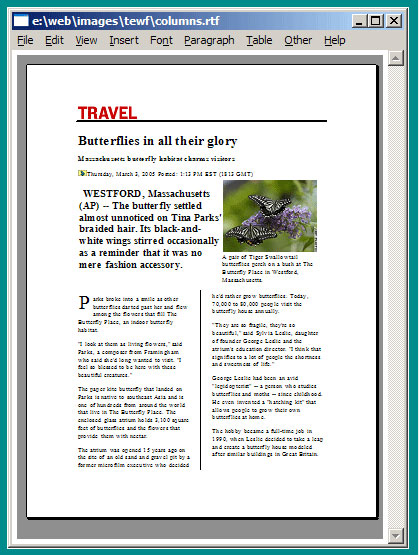
Multi-section documents
- Newspaper-style columns
- Multiple page orientations in one document
- Multiple paper sizes in one document
- Headers and footers per section
- Page border and alignment
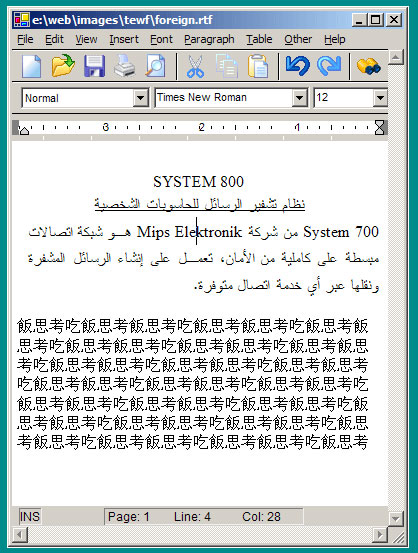
Foreign language support
- Right-to-left and mixed Latin text
- Asian text
- Multi-character Unicode glyphs
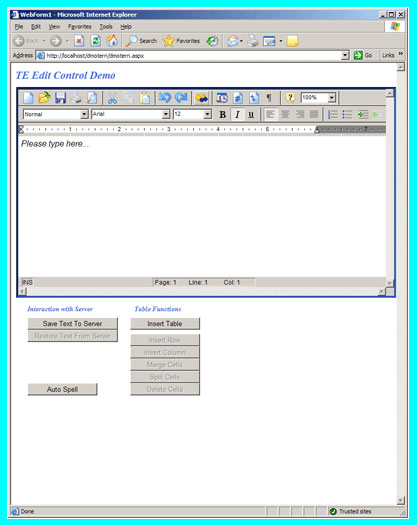
ASP.NET interface
- Drop the component into your ASP.NET application to edit the original RTF data
- True RTF editing; no HTML/RTF conversion needed
Add-on products
- HTML Add-on: export and import HTML text
- SpellTime: on-demand and as-you-type spell checking
- WinPDF Converter: export to PDF
- DOC Add-on: import Word DOC files
Languages and frameworks
Visual C/C++ and MFC
The Win32 and Win64 packages include two MFC class wrappers, CTerView and CTer. The view
class lets you use the editor in a Document/View architecture; the edit class drops it into a window or a dialog box.
The DLL can also be called directly, without any MFC libraries.
Visual Basic, VB6, VBScript, JScript, Delphi, PowerBuilder, Visual FoxPro, C++Builder
TE Edit Control for Win32 includes an ActiveX component that can be dropped onto an application form. Use the control properties for basic settings and the full API function set for any text manipulation the control allows.
Other environments supported by the Win32 package: Borland OWL and Progress.
C# and .NET
TE Edit Control for .NET Framework and .NET Core is a Windows Forms component written in pure managed C#. It can be
hosted in a WPF application through WindowsFormsHost, and the .NET Core package also runs in Linux server applications.
Java
TE Edit Control for Java is a Java component compatible with Java Standard Edition 7.0 or later. The component extends
the Panel class.
HTML and JavaScript
TE Edit Control for HTML/JavaScript is pure browser-side code: it edits inside the browser's secure environment with no server-side support, works in all current browsers on Windows, Mac and Linux, and includes mobile and touch support. Try it online.
Web and ASP.NET interface
The HTML/JavaScript, Win32, .NET and Java editions each include a web component that can be dropped into a web application from Visual Studio. Which one should you choose?
TE Edit Control for HTML/JavaScript is the only cross-browser edition and is the one to use for new web applications. It is designed to run within the secure environment of the browser and needs nothing on the server for editing.
The Win32, .NET and Java web wrappers run on Internet Explorer only; they are not supported on Microsoft Edge, Firefox or Chrome. The .NET wrapper requires the client machine to grant full trust to your site, the Win32 wrapper requires ActiveX support in the browser, and the Java wrapper requires the browser's standard Java runtime.
Source code
The complete DLL source code is available for an additional cost for the Win32, Win64 and .NET editions. The Win32 and Win64 source is written in C, compatible with Microsoft Visual C++; the .NET source is C# managed code. See the "with DLL source" rows on the prices and purchasing page.
Version history
Licenses include new releases for the license term.
Version 32
- Improved pagination support.
- Improved DOCX export and import.
- Improved support for table-of-content.
- Support for picture rotation for watermark.
- Improved list bullet/number support.
- Improved support for Far-East text processing.
- Improved support for right-to-left text.
- Support for picture cropping.
- Support for the 3-dot toolbar option.
- Mobile support for the HTML/JavaScript version.
- Touch support for the HTML/JavaScript version.
- Other enhancements and bug fixes.
Version 28
- Improved pagination support.
- Improved DOCX export and import.
- Improved support for table-of-content.
- Improved watermark support.
- Improved support for picture cropping.
- Improved list bullet/number support.
- Improved support for Far-East text processing.
- Improved support for picture cropping.
- Support for 3-dot toolbar option.
- Mobile support for the HTML/Javascript version.
- Touch support for the HTML/Javascript version.
- Improved support for right-to-left text.
- Other enhancements and bug fixes.
Version 27
- Improved support for shapes.
- Improved DOCX export and import.
- Improved support for complex table structure.
- Improved header/footer support.
- Improved footnote support.
- Improved list bullet/number support.
- Improved tab support.
- Improved support for Far-East text processing.
- Improved support for picture cropping.
- Support for custom fonts in TE Edit Control for HTML/Javascript.
- Improved support for right-to-left text.
- Other enhancements and bug fixes.
Version 26
- Improved support for Far-East text processing.
- Improved DOCX import.
- Improved support for picture cropping.
- Improved support for text input fields.
- Improved support for highlight colors.
- Improved support for international date formats.
- Support for custom fonts in TE Edit Control for HTML/Javascript.
- Improved support for shapes.
- Improved support for right-to-left text.
- Improved support for complex table structure.
- Improved support for list formatting.
- Improved support for text line spacing.
- Other enhancements and bug fixes.
Version 25
- Availability of TE Edit Control for HTML/Javascript for a browser independent cloud solution.
- Improved support for shapes and support for additional shapes.
- Support for text inside the shapes.
- Support for the double-strike attribute.
- Improved support for right-to-left text.
- Support for Unicode text in footnotes.
- Improved support for complex table structure.
- Improved support for list formatting.
- Improved support for text line spacing.
- Improved support for text input fields.
- Support for distribute justified text formatting.
- Other enhancements and bug fixes.
Version 24
- Support for Microsoft Speech Recognition.
- Support for bullet library.
- Jump to topic from the table-of-content.
- Support for additional flow chart elements.
- Improved support for Asian and far-east languages.
- Improved support for math symbols.
- Improved table support.
- Support for custom comment data.
- Improved support for text inside shapes.
- Other enhancements and bug fixes.
Version 23
- Support for text inside the rectangle, ellipse and other shapes.
- Opacity support for the text-boxes and rectangles.
- Support for the SEQ labels to generate table-of-figures and other type of table of contents.
- Support for the right-margin aligned shapes.
- Support for the Custom page numbering format.
- Support for the Custom properties in the RTF file.
- Improved Shape Group support.
- Option to maintain list numbering when pasting or inserting another RTF in the current document.
- Option to automatically show and hide the scrollbars.
- Improved DOCX import/export.
- Other enhancements and bug fixes.
Version 22
- Support for the sequence field which allows for automatic sequence number generation.
- New method to apply a picture to the data field.
- Support for embedded documents in the docx files.
- Improved support for variable-width multi-column sections.
- Support for adjacent page-number fields.
- Support for local hyperlinks.
- Enhancements to the list/bullet feature.
- Support for style-linked paragraph numbering.
- Support for additional style attributes.
- Improved DOCX import/export.
- Other enhancements and bug fixes.
Version 21
- Format painter support to paint current formatting to the selected text.
- Support for even/odd section starting pages.
- Text highlighting support.
- Support for extended RTF and DOCX document properties.
- Support for data-field locking.
- Improved right-to-left text support.
- Improved frame positioning support.
- Improved DOCX import support.
- Other enhancements and bug fixes.
Version 20
- Support to export the document to the DOCX format. (not yet available for the Java version)
- Gutter margin support.
- Support for optional right-click context menu.
- Automatic tagging of text input.
- Option to start or resume a list upon copy/paste.
- Unicode file names for input/output and picture functionality.
- Improved DOCX import support.
- Other enhancements and bug fixes.
Version 19
- Support for commenting/annotation.
- Support for vertically centering of frame objects.
- Support for placeholder picture for the missing linked images.
- Support for external resource dll.
- Support for applying session wide font point-size and style limits.
- DOCX support enhancement. (not yet available for the Java version)
- Custom font support.
- Option to use printer-specific fonts.
- Other enhancements and bug fixes.
Version 18
- Support for document sections with variable column width.
- Support for splitting a table cell vertically.
- Create the table-of-content using custom styles and field-codes.
- Unicode support for hyperlink urls.
- Support for flowing text in-between interconnected text-box objects.
- Support for applying RTF text to the mail-merge data fields.
- Enhanced shape handling support.
- Support for spooling multiple documents in single print job.
- Support for the left/right bracket drawing objects.
- Other enhancements and bug fixes.
Version 17
- Track-changes enhancement: The track-change feature now supports the changes to paragraph formatting attributes such as justification, paragraph spacing, borders, etc.
- Support for the selection type input field. This feature allows the user to select from a list of available items.
- Enhanced IME support.
- Support for unicode field names.
- Support for multipoint shape objects.
- Support for importing MSWord DOC format file using one of our new products called DOC Add-on. DOC Add-onmust be purchased separately. (not yet available for the Java version)
- Support for hiding changes when the track-changes option is enabled.
- Support for rounded corner rectangle shapes.
- Support for custom font list.
- Other enhancements and bug fixes.
Version 16
- Import of the new MS Word DOCX format files. Now there is no need to save MSWord files into the RTF format to read into TE Edit Control.
- Track-changes enhancement: The track-change feature now supports the changes to character formatting attributes such as font, font size, character style, text-color, etc.
- Support for the unicode list text.
- Support for the double-line-strike text style.
- The new version includes a number of stylesheet enhancements.
- Enhanced support for Arabic/Hebrew and Asian languages.
- Auto-spacing between the paragraphs.
- Enhancement to the text input field handling.
- Improved support for the inline images.
- Other enhancements and bug fixes.
Version 15
- Support for Even/Odd headers and footers.
- Autofit table row. You can now create a table with the Autofit attribute which instructs the editor to automatically adjust the table column width as the user enters the text into the table cells.
- Support for popular Chinese paragraph numbering schemes.
- Support for placing the text-box anchor within a paragraph facilitating accurate placement of text-boxes anchored within a paragraph.
- Improved handling of punctuations and mix text in right-to-left text processing.
- Separation line between columns for the multi-column sections.
- Alternate methods to access pass-by-reference parameters in scripts.
- Automatic resize the pictures to fit the containing page, table cell, or a section column.
- Additional unicode handling functions.
Version 14
- Vertical ruler.
- Tab-type selection on the ruler.
- Enhancements to the Track-Changes feature. TE now allow you to reject one or all changes done to the document.
- Arrow line object.
- Ability to change the combo-box width on the toolbar.
- Hyphenation support using a third party control.
- Character scaling: The user can now scale the text horizontally by specifying a scale percentage.
- Additional editing functions to automatically add new table rows.
- Menus for the web control: The menu allows the user to access all editing functions when using the control within a web browser.
- Other enhancements and bug fixes.
Version 13
- Track Changes: TE now allows for tracking changes by multiple reviewers. You can find and accept individual changes, or all changes.
- Auto-completion feature: TE now allows your users to type in keywords. TE can then automatically expand the keyword to a specified phrase or word.
- Page Line Numbering: This feature allow you to display and print line number on the left margin area. The page-line numbering feature is available at the section level.
- Page background color: This feature allows for setting the page background color at the section level.
- TIF picture support.
- Undo of table attributes: In addition to table text modification, you can now undo any modification to the table structure and attributes.
- Embedded ActiveX Component.
- Full drag/drop: You can now drag text from TE and drop it in to another application, or drag text from another application and drop it in to TE Control.
- Support for Dragon Speech Library.
- Nested shape groups: This feature strengthens the TE's ability to display complex nested shape groups found in MSWord generated documents.
- Other enhancements and bug fixes.
Version 12
- PDF export using our WinPDF Converter. TE now includes an automatic interface to WinPDF Control. You would simply use the TE APIs to generate the PDF output for the currently loaded document. The WinPDF converter needs be purchased separately.
- Vertical Text in Table Cell: You can now set the text to flow top-to-bottom, or bottom-to-top within a table cell.
- Support for Watermark picture: The watermark picture can be inserted with regular or washed appearance.
- Page Reference Field: This feature allows you to insert the page number of a referenced bookmark. You can also enable hyperlink to jump to the reference bookmark location.
- Custom message and string constants: This feature allows you to translate the editor messages into other languages, or to modify the built-in message text.
- Printer independent word-wrapping and pagination.
- GIF picture feature is now integrated in the editor dll, and is available without any special licensing.
- Enhanced list processing: The user can now use the Enter, Del, and Tab keys to create new list item, terminate the current list, or to increase or decrease the list level.
- Undo and Redo of frame, and drawing objects positioning and resizing operations.
- Paragraph Border Color.
- Outline around the selected table cells.
- The maximum line width increased from 300 to 1000.
- Additional numbering formats for displaying the lists.
- Other enhancements and bug fixes.
Version 11
- Enhanced Input Text fields: The new input text fields can grow dynamically. The field text wraps along with the document text.
- Enhanced Table Operation Undos: Most table edit operations can now be undone.
- Table text deletion: The editor now offers an option to delete the content ofthe selected table cell, or to delete the entire cell structure.
- Print using standard Windows dialog box, or print using the proprietary dialog box.
- Support for ellipse shape object.
- Support for shape groups. This allow TE to display more complex MSWord files containing pictures and objects.
- Multiple page number formats (decimal, Roman or Latin number formats).
- Display space symbol: Together with the paragraph, cell, and tab symbols, you can now also display the space symbol.
- Underline color. You can specify the color for the underline bar.
- Toolbar enhancement: You can now add new icons to the built-in toolbar.
- Other enhancements and bug fixes.
Version 10
- Picture cropping - truncate picture or add white space around a picture.
- Vertical centering and bottom alignment of page text.
- Drag the cell border to modify the table row height.
- Undo/redo for spell-checking and search/replace operations.
- Right-to-left and mix latin/arabic text support.
- Long file name support for all file access operations.
- Paragraph border enhancement - support for line between paragraphs.
- Unlimited levels of undos and redos.
- Drag and drop of formatted text from MSWord and other applications.
- Support for hidden paragraphs in list numbering.
- Other enhancements and bug fixes.
Version 9
- Vertical text support within a frame or text box (top-to-bottom or bottom-to-top text flow).
- Intelli-mouse support with bi-directional mouse wheel cursor.
- Multiple page sizes within a document.
- Single, double or triple line page borders.
- Picture offset - allows you to adjust picture position relative to the text baseline.
- Multiple language text support within a document.
- Output jpeg and png picture in original format reducing file sizes substantially.
- Most DLL functions are now also available as ActiveX Component methods.
- Automatic offset for Equation objects.
- Support for embedded ActiveX controls.
- Baseline text alignment within a table cell.
- Search/replace feature for Unicode text.
- Bug fixes, etc.
Version 8
- Section and document Endnote support.
- Table border color.
- Enhanced paragraph numbering using lists for compatibility with MSWord 2000.
- Dynamic spelling. This feature requires that SpellTime is also installed.
- Unicode symbol support for rtf and text import/export.
- Exact margin support.
- Support for automatic capitalization and small caps.
- Variable line spacing.
- Support for additional fields such as LISTNUM, AUTONUMGL.
- Support for inserting tables into positionable frames and text boxes.
- Bug fixes, etc.
Version 7
- Nested table support for compatibility with MSWord 2000.
- Automatic Table of contents.
- Date and Time field in various formats.
- PNG (portable network graphic) picture support.
- Printing and print-preview with background picture.
- Variable text offset height from the base-line.
- Character borders.
- Bug fixes, etc.
Version 6
- First Page header/footers.
- Bookmarks.
- Wysiwyg footnote support.
- Enhanced Metafile picture support.
- Drag/drop of text and RTF files.
- Option to print multiple collated or non-collated copies of the document.
- Embeddable into MS Internet Explorer 4.0.
- Repeating table headers.
- Multibyte Character Set support for Far Eastern and Arabic languages.
- Undo/Redo of paragraph attributes.
- Optional hyphenation.
- Picture animation.
Ready to evaluate?
Download an evaluation package for any edition, or write to info@subsystems.com with questions about a specific feature.